What comes out
Cut, captioned and levelled on your own Mac
Raw take2:45
B-roll cut0:37
Photo pop-ups0:34
An add-on for the AI you already use. It edits on your Mac, from your own clips.
One real reel, start to finish
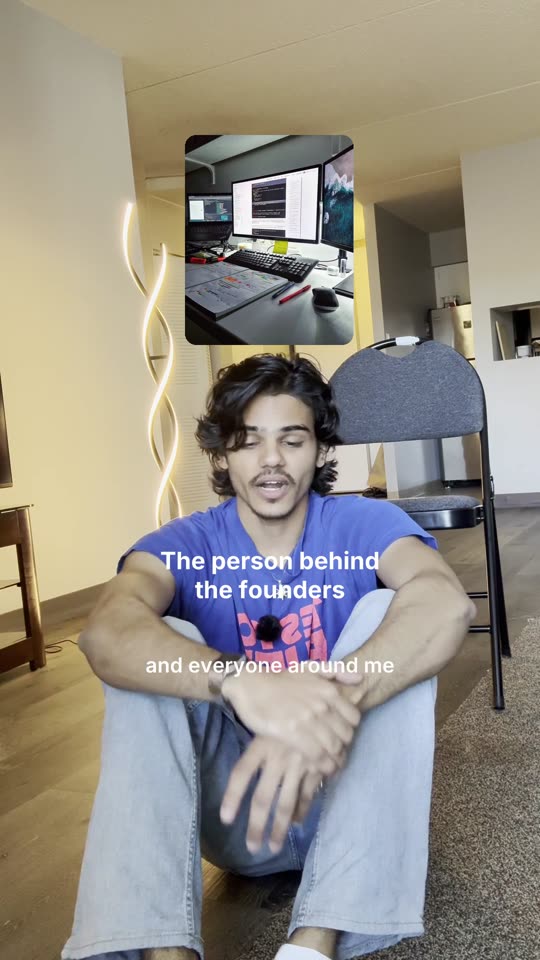
A 2 minute 45 second take with every line said two or three times, edited by Claude with Revamp into a 34 second reel. Every card is from that edit. Sweep your mouse across them.
00.0I love this. I don't want to be a founder. I want to be a person behind them.[5.7s]
09.7At 20, I started my own creative business with one single call goal that I want to tell stories.
14.8And I had no idea I would end up working with creative...[2.5s]
20.5And I had no idea I would end up working with AI founders to tell their stories.[1.7s]
26.4For con... For context, I'm a CS student and everyone around me was building the next AI app. And so was I.[13.7s]
45.9But every founder I met had the exact same problem. They had the good idea. They had a good idea. They had...[8.1s]
61.1But every single founder I met had the exact same problem. The product was, the product was good, but nobody cared.
01
Listen first
Whisper writes down every word with its time, on your Mac. Your AI picks the best take of each line, fixes what it misheard and never rewords what you said.
transcribe · 1 word fixed, retakes struck out
- Raw clip164.51 s130.31 s of pauses cut34.20 s reel
02
Find the dead space
Revamp reads the audio level every 10 ms. Your AI cuts the retakes and the dead air between them, and keeps the small gaps inside a phrase.
find_pauses · 44 pauses found
plan.md
- Hook
- “I don't want to be a founder. I want to be a person behind them.”
- Cut
- “I love this,” every retake and false start, and the dead air between takes
- Keep
- The best take of each line, in order
- Fix
- 1 misheard word. Nothing reworded
- Layout
- Face centred, section titles on the chest, photos above the head
- Length
- About 34 s
Looks good, go
03
Show you the plan
Before anything renders, you see the hook, the cut list and the layout. Change anything in plain words.
plan.md

- Face centre
- x 900 of 2160
- Crop
- 1800 × 3200
- Zoom
- 1.15×
04
Centre the face
Your AI reads the face position off a gridded frame, never a guess, and crops to 9:16 around it.
look · grid
 Top barUsername, song, caption
- Pink Instagram covers it
- Green Text belongs here
- Blue Captions at y 1330
05
Stay clear of Instagram
Photos go above the head, titles and captions on the chest, and nothing important sits under the app's bars or buttons.
look · safe area
Measured on the finished file
- Resolution
- 1080 × 1920
- Frame rate
- 30 fps
- Loudness
- -14.0 LUFS
- True peak
- -2.1 dBFS
- Size
- 26.0 MB
- Length
- 34.2 s
06
Measure it
The finished file is checked against the spec: size, frame rate, loudness and peak. Numbers, not vibes.
measure · 7 of 7 passed
07
Post it
A 2 minute 45 second take full of retakes, cut, captioned, framed and levelled, and ready to post.
out/founder-reel.mp4
Cut the way
an editor would
Every reel comes out tight
Revamp gives your AI a working editor's rulebook and the tools to follow it, on your own computer
How it works
- Add Revamp to your AI app once
- 16 editing tools and the rulebook
- Nothing new to open: it lives in the chat
Your AI app · Extensions
Revamp
Short-form reel editor
Gives your AI these tools, plus the editing rulebook:
- Runs on your Mac
- One payment, no subscription
- Uses the AI plan you already pay for
- Your clips are never changed
Your footage stays yours
Revamp runs on your computer. Clips are read where they are, never uploaded and never changed.
Edited like a pro would
Built on a working editor's rulebook: tight cuts, clean captions, safe areas and real QA.
You approve the plan
Your AI shows you the hook and the cut list before it renders. Ask for changes in plain words.
Made for whoever's on camera
Creators
Post every day without spending every evening editing.
Founders
Turn podcasts, demos and talks into reels that bring in customers.
Editors
Hand the first cut to your AI and spend your time on the parts that need you.
One payment
Yours to keep
Pay once and keep it. No subscription, and every update to the rulebook is included.
- The Revamp editor for your AI app
- The full editing rulebook
- Transcribe, cut, captions, export and QA tools
- Runs on your Mac: no uploads, no per-reel fees
$29.99
- A Mac
- Windows is on the way
- An AI app
- Claude, Cursor, VS Code or any app that supports MCP. Revamp uses your plan and costs nothing extra to run
- Your footage
- Phone clips, camera files, podcast recordings, vertical or landscape
Questions,
answered
SetupIs Revamp an app?+
It's an add-on for the AI app you already use (an MCP extension), like Claude, Cursor or VS Code. You keep chatting as usual; Revamp gives your AI the tools to edit video and the rules for editing it well.
PrivacyIs my footage uploaded anywhere?+
No. Everything runs on your computer. Your clips are read where they are and never changed; the finished reel is saved in a Revamp folder on your Mac. Your AI sees the transcript and a few still frames to plan the edit, through your own account with it.
CostWhat does it cost to run?+
Nothing beyond the one payment. The editing uses the AI plan you already have, and your computer does the rendering.
FormatsWhat kinds of reels can it make?+
Talking-head reels with clean captions, tight cuts and studio-level sound today. Split screens and animated graphic layouts are coming in updates.
ChangesCan I ask for changes?+
Yes. Tell your AI what to change, like "shorter hook" or "bigger captions", and it re-renders from your original footage.